What Makes a Great Presentation Template? An Exploration of Keynote Design
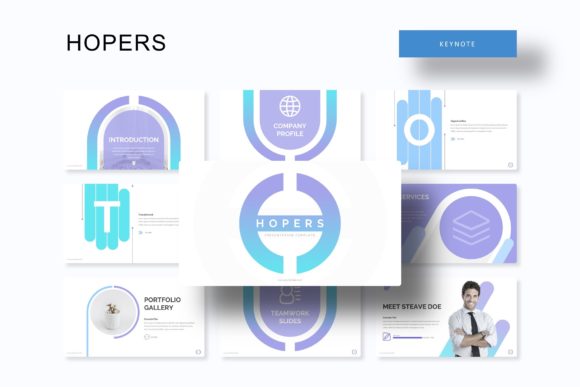
Creating a compelling presentation is an art that blends storytelling, design, and strategy. For many, whether in business, education, or creative fields, the process begins not with a blank slide, but with a template. A high-quality template provides the scaffolding upon which a powerful message is built. Let's explore what constitutes an exceptional presentation template by examining a specific example: a comprehensive Keynote template offering multiple color schemes, extensive slides, and flexible editing features.
The Foundation: Understanding Presentation Template Structure
At its core, a presentation template is more than just a collection of pretty slides. It is a structured system designed to streamline the creation process while maintaining visual coherence. A robust template is built on a master slide system. This is the foundational layer where global design elements—like background styles, font defaults, and logo placements—are defined. When you edit a master slide, changes propagate throughout the entire presentation, ensuring consistency and saving immense time. This behind-the-scenes framework is crucial for professional results, as it guarantees that every slide adheres to the same visual language without manual adjustment on each page.
Volume and Variety: The Significance of Slide Count and Color Themes
A template offering a high number of total slides, such as 150, provides an extensive toolkit. This volume isn't about redundancy; it's about options. Different presentation moments require different slide layouts: a bold title slide, a detailed infographic, a simple text-and-image split, or a focused portfolio gallery. Having 30 slides for each of 5 premade color variations means the presenter can choose a color palette that aligns with their brand, topic, or emotion—be it corporate blue, energetic orange, or calm green—and still have a full suite of layout options for that specific theme. This variety empowers users to maintain stylistic consistency while adapting content across various sections of their talk.
Key Components of a Modern, Flexible Template
Modern presentation needs demand flexibility. A template's true value is measured by how easily it can be adapted to your unique content.
Editable Graphics and Placeholders
The phrase resizable and editable graphic is pivotal. It means that every icon, chart, and diagram isn't a static image but a vector object within the presentation software (like PowerPoint or Keynote). You can change its color, size, and shape without losing quality or needing separate graphic software. Combined with picture placeholder functionality that allows for drag-and-drop image insertion, this feature makes the template truly user-friendly. You replace the placeholder image with your own photograph or graphic, and it automatically fits into the designed frame, maintaining the layout's balance and professionalism.
The Role of Specialized Slides
Purpose-built slides address specific presentation needs. Handcrafted infographics are pre-designed charts, processes, and data visualizations that you can populate with your own numbers and text. A section break slide provides a clear visual transition between different parts of your presentation, helping to structure your narrative for the audience. Gallery and portfolio slides offer elegant grids or carousels specifically formatted to showcase images, products, or projects, which is invaluable for creative pitches, case studies, or company overviews.
Technical Quality and User Support
Beyond the visible design, technical execution and support materials define a professional template product.
Pixel-perfect illustrations ensure that all graphic elements are crisp at any size, with no blurry edges or misaligned lines, which is essential for displaying on large screens or high-resolution monitors. The delivery format—often as PPTX files for standard and widescreen (16:9) aspect ratios—guarantees compatibility with the most common presentation software. Providing both standard and widescreen versions accommodates different display setups and projector configurations.
What's Included and What's Not
A transparent template listing clearly states the deliverables. Typically, this includes the core template files (like 5 PPTX files for each color), a readme first instruction file, and links to the free fonts used. Crucially, it also clarifies that photographs or pictures used in the preview are not included. They are demonstration placeholders intended to show the layout's potential. This distinction is important for users to understand they will need to supply their own imagery, freeing the template from licensing issues and encouraging the use of personalized, relevant visuals.
The Practical Relevance in Modern Work and Communication
Why does this level of template detail matter in real-world scenarios?
In a fast-paced business environment, efficiency is key. A comprehensive template eliminates the need to design from scratch, allowing teams to focus on crafting the message and refining the content rather than wrestling with alignment and formatting. It ensures brand consistency across departments; marketing, sales, and HR can all use the same template system, producing presentations that look cohesively like part of the same organization.
For educators and students, such templates provide a structured way to present research findings or lecture material. The infographics aid in explaining complex concepts, and the clear hierarchy of headings (H1, H2, H3 as mirrored in slide titles) helps organize information logically for the audience.
Freelancers and creative professionals benefit immensely from the portfolio and gallery slides, which are ready to showcase their work to clients without needing bespoke design for each new project pitch. The multiple color options allow them to tailor the presentation's mood to the specific client or project type.
Clarifying Common Misunderstandings
A common assumption is that using a template makes a presentation generic. This is a misunderstanding. A template provides the visual framework; the content, storytelling, and personal data you insert make it unique. Like a well-designed house, the architecture (template) supports and enhances the life (content) within it. Another misconception is that templates are rigid. The features discussed—fully editable graphics, drag-drop placeholders, and multiple master slides—show that a good template is inherently flexible, designed to be molded to your specific needs.
Building a Broader Understanding of Presentation Design
Evaluating a template through these features encourages a broader understanding of effective communication. It teaches that design is systematic, that consistency aids comprehension, and that preparation (in the form of a ready-to-use toolkit) enhances performance. The goal is always to remove technical barriers so the presenter can connect more authentically with the audience. Whether for a startup investor meeting, a university dissertation defense, or a community workshop, the principles remain the same: clarity, coherence, and visual support for a compelling narrative.
In conclusion, a sophisticated presentation template is a strategic asset. It embodies the principles of good design through its master slide foundation, offers practical versatility through editable elements and varied slide types, and supports the user with clear deliverables and technical precision. By understanding the components and purpose of such a template, anyone can make more informed choices about their presentation tools and ultimately create more effective, engaging, and professional slides that resonate with their audience and achieve their communication goals.