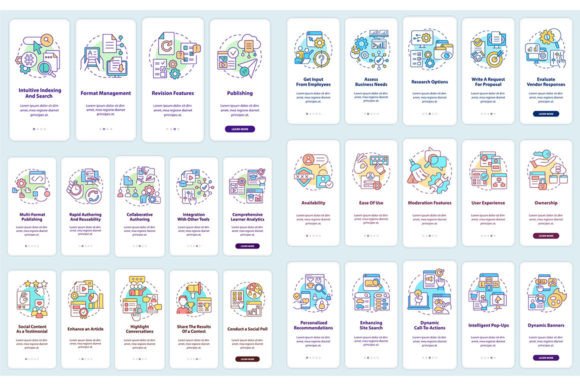
Integrating LCMS and CMS Features into Your Mobile App: A Practical Guide
In the fast-paced world of digital learning and content management, having a robust mobile application isn't just an advantage—it's a necessity. For organizations leveraging Learning Content Management Systems (LCMS) and traditional Content Management Systems (CMS), extending these powerful platforms into the mobile space unlocks immense value. This is where an LCMS and CMS Features Mobile App Set comes into play, serving as the bridge between your backend systems and your users' smartphones.
Why Mobile Integration is Crucial for Modern LCMS and CMS
Think about how people consume information today. They are on the move, checking notifications during commutes, completing short training modules between meetings, or browsing content from their couch. A desktop-only LCMS or CMS misses these critical touchpoints. A dedicated mobile app set transforms these systems from static repositories into dynamic, engaging tools that are always accessible.
The core purpose is to mirror and extend the key functionalities of your LCMS and CMS onto a mobile interface. This means learners can access courses, track progress, and receive updates. Content managers can get alerts, review drafts, or even make minor edits. It brings the system's features to life in the context where users actually live and work.
Key Characteristics of a Successful Integration
Simply porting a web interface to a smaller screen doesn't work. A successful LCMS and CMS Features Mobile App Set requires thoughtful adaptation. Important qualities include:
- Streamlined Onboarding: The initial user experience—the onboarding mobile app screen set—must be intuitive, guiding new users through permissions, profiles, and initial setup without friction.
- Context-Aware Functionality: The app should prioritize features most valuable on mobile, like offline access to key content, push notifications for deadlines, or quick submission forms.
- Seamless Sync: All user actions on the mobile app must seamlessly synchronize with the central LCMS or CMS database, maintaining data integrity and a unified user state.
- Adaptive UI/UX: The graphical user interface (GUI) must adhere to mobile design principles, using touch-friendly elements and a hierarchical information structure suited to vertical scrolling.
A Walkthrough of the Integration Process
Implementing an LCMS and CMS mobile app isn't a single step; it's a journey with clear stages. Having a set of editable graphic instructions with linear concepts can dramatically smooth this path for your development and design teams.
Consider this typical integration walkthrough:
- Feature Mapping & Prioritization: Audit your LCMS/CMS backend features. Decide which are "core" for mobile (e.g., course catalog, video playback, news feed) and which are "secondary" (e.g., advanced reporting dashboards). This defines the app's scope.
- UI/UX Template Application: This is where pre-designed mobile app screen templates become invaluable. Using a set of templates for common screens—login, dashboard, content viewer, quiz, profile—ensures design consistency and speeds up development. For example, using a clean template with fonts like Myriad Pro Bold for headers and Myriad Pro Regular for body text establishes a professional, readable typographic system instantly.
- API Connection & Data Flow Design: Establish how the mobile app will talk to the LCMS/CMS backend. This involves configuring APIs to pull content, post user interactions, and handle authentication securely.
- Onboarding Sequence Build: Construct the welcome journey using your onboarding mobile app screen set. This sequence should visually explain the app's value, set up user preferences, and request necessary permissions in a friendly, non-intrusive way.
- Testing the Integrated Experience: Rigorously test not just the app, but the entire loop: user action on app → data update in LCMS/CMS → reflected change back on app. This ensures the "set" works as a cohesive system.
- Launch & Feedback Iteration: Deploy the app and monitor usage analytics specifically for the integrated features. Use feedback to refine the mobile experience continually.
The Role of Design Assets and Templates
Having high-quality, versatile design assets is a practical benefit that can't be overstated. When your project resources include a zip file containing 6 mobile app screen templates in formats like EPS, SVG, PNG, JPEG, and AI, the workflow accelerates. These formats cater to different needs: SVG for scalable icons, AI for editable vector layouts, PNG for immediate placement. They provide a visual foundation that ensures brand alignment and professional polish while allowing customization.
Furthermore, this extends beyond the app screens themselves. Companies like BSD Studio, which often provide such assets, also create related materials like icons, brochure infographic templates, and more. This means you can maintain a consistent visual language across your mobile app, promotional materials, and internal documentation, all reinforcing the integrated LCMS and CMS features.
Fitting into Modern Workflows and Projects
Where does this fit? Virtually anywhere focused on knowledge and content.
- Corporate Training: Employees can complete micro-learning sessions anywhere, increasing engagement and completion rates.
- Higher Education: Students access lecture materials, submit assignments, and participate in forums directly from their mobile devices, complementing the campus LMS.
- Media & Publishing: A CMS-powered mobile app lets subscribers read articles, watch videos, and manage their accounts on-the-go, driving higher content consumption.
The integration makes the LCMS or CMS an omnipresent tool, deeply embedded in the daily workflow rather than a destination users must consciously visit.
Practical Considerations Before You Begin
Adopting an LCMS and CMS Features Mobile App Set requires some forethought. Key factors to consider include:
- Backend Readiness: Is your current LCMS or CMS technically capable of supporting mobile API integration? Its architecture must be robust and secure.
- User Needs Analysis: Conduct surveys or interviews to discover which features your users actually want on mobile. Avoid building based on assumptions.
- Resource Commitment: Beyond initial development, consider the ongoing maintenance of the app, its updates, and the support structure for mobile users.
- Visual Cohesion: Plan how the mobile app's GUI will align with your existing web platform and brand identity. A disjointed experience harms credibility.
Ultimately, the goal is to create a mobile experience that feels like a natural, empowered extension of your core systems—not a separate, stripped-down tool. By leveraging structured walkthroughs, professional UI/UX templates, and high-quality design assets, teams can navigate the integration process more efficiently, resulting in an app that truly enhances how users interact with their LCMS and CMS content every day.
To stay current on best practices, new asset releases like mobile app screen pages, and potential discounts on template sets, many professionals subscribe to resources from specialized studios. Engaging with communities like BSD Studio, which offers new topics and discounts every week, can provide a steady stream of inspiration and practical tools to keep your integrated mobile offerings sharp and effective.