Vegeda: A Versatile Presentation Template for Modern Creators
Every project starts with an idea, but communicating that idea clearly and persuasively is where the real challenge begins. Whether you're pitching to investors, presenting a company profile to new clients, or showcasing a personal portfolio, the foundation of your communication is your visual narrative. The Presentation Template - Vegeda is designed to be that foundation—a robust, adaptable starting point for anyone who needs to present information with clarity and style.
What Makes Vegeda a Practical Toolkit
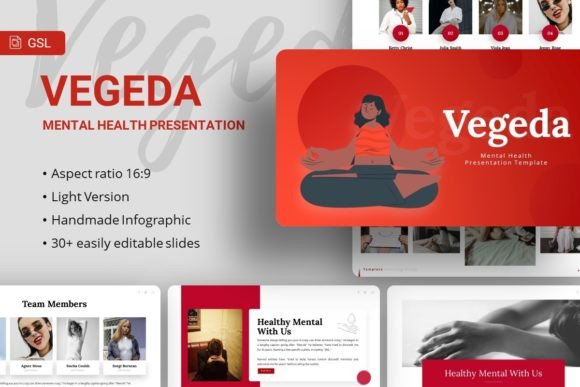
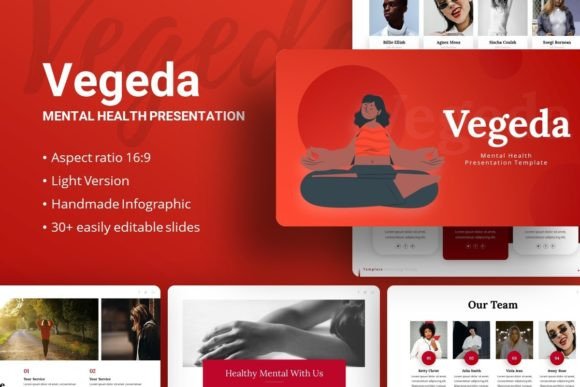
Vegeda is not merely a set of slides; it is a structured design system. Built with 35 unique slides for each template variation, it provides a comprehensive range of layouts from title pages and content sections to handcrafted infographics and data visualizations. The design is based on master slides, ensuring that any change you make—to fonts, colors, or backgrounds—flows consistently throughout your entire presentation. This isn't about rigid uniformity, but about efficient consistency, saving you hours of manual alignment.
The practical features speak directly to the needs of a busy creator. All illustrations and graphics are pixel-perfect, resizable, and editable directly within PowerPoint. You can drag and drop your own images into the picture placeholders, pulling from your own library or the recommended free sources like Unsplash, Pixabay, and Pexels. The included Lato and Noto-sans fonts offer a clean, modern typographic palette. Importantly, the template includes the .PPTX file and documentation, giving you full control and guidance to customize the content easily for your specific purpose.
Beyond the Slide Deck: Interpreting Vegeda for Your Audience
The true value of a versatile template lies in its reinterpretation. Vegeda’s clean, contemporary aesthetic and logical structure act as a canvas. Your content and your audience’s needs determine the final artwork.
For Entrepreneurs and Startups
If your audience is a venture capitalist or a potential partner, your pitch deck must balance vision with granular detail. Use Vegeda’s infographic slides to distill complex market data or business models into digestible visuals. The structured layouts can guide your narrative from problem identification to your unique solution, financial projections, and team introduction. The professional aesthetic builds credibility, while your customized content—swap in photos of your actual prototype or team—makes it authentically yours.
For Creative Agencies and Freelancers
Here, the template becomes a portfolio and a proof of capability. A creative agency can use it to present a company profile, showcasing past campaigns using the image-focused slides. A freelance designer or photographer can adapt it into a striking personal portfolio. The key is to let your work dominate. Use the clean backgrounds and placeholder frames to highlight your images and projects. The template’s organization keeps the presentation flowing smoothly from introduction to case studies to contact details, ensuring your creative work is supported by a professional framework.
For Educators and Corporate Teams
Internal training, client workshops, or academic presentations require clarity and engagement. Vegeda’s master slide consistency helps maintain a coherent thread through lengthy or complex material. The variety of slide types allows you to intersperse text-heavy content with illustrative diagrams, keeping the audience visually engaged. For a corporate business presentation, such as an annual review or a new initiative launch, the template provides a neutral, professional base that can be branded with company colors and logos, ensuring the message is delivered with authority and cohesion.
Creative Adaptation Without Overcomplication
The temptation with a flexible tool is to over-customize, leading to a disjointed final product. The guiding principle should be audience-first clarity. Start by defining the core message for your specific viewers. Then, map that message to the slide sequence Vegeda provides. Use its 35 slides as a menu, selecting the layouts that best serve each part of your story. Perhaps the “process” infographic slide perfectly explains your workflow, or the “comparison” layout clearly contrasts two options for a client.
Customization should enhance, not obscure. Stick to a limited, harmonious color palette that aligns with your brand or topic. Use the recommended fonts or choose ones with similar characteristics for readability. When inserting images, ensure they are high-quality and relevant. The template’s drag-and-drop functionality makes this easy, but the creative judgment of choosing the right image remains yours. The included vector icons can be resized and recolored to act as subtle visual cues throughout your presentation, reinforcing themes without adding clutter.
Maintaining Originality Within a Framework
Using a template does not mean sacrificing originality. Your unique content—your data, your photographs, your insights, your voice—is what makes the presentation original. Vegeda’s structure handles the universal concerns of alignment, consistency, and visual hierarchy, freeing you to focus on crafting that unique content. Think of it as the architecture of your presentation; you decide what hangs on the walls, what stories are told in each room, and what feeling you want the visitor to have when they leave.
A Template for Ideas, Not Just Presentations
Interestingly, Presentation Template - Vegeda can also serve as a tool for ideation and planning. Its structured layouts can be repurposed outside of PowerPoint. For example, a blogger or publisher might use the slide concepts as an outline for a long-form article or a series of social media posts. The clear sections—introduction, key points, supporting evidence, conclusion—provide a logical flow for any communicative project. A startup team might even use the infographic styles as a whiteboarding guide when mapping out their business plan on a physical board.
This expands its utility from a presentation-making tool to a thinking aid. The visual organization prompts you to consider how information fits together, what needs emphasis, and where visual breaks are necessary. It encourages you to move beyond bullet-point lists and consider the narrative shape of your information, which is beneficial for any creator, marketer, or educator.
Ultimately, Vegeda is a bridge between your raw ideas and your audience's understanding. It provides the structural confidence to present those ideas effectively, whether your goal is to secure funding, win a client, share knowledge, or showcase artistry. By focusing on easy customization, professional design fundamentals, and versatile applications, it empowers you to spend less time on slide construction and more time on what matters most: refining your message and connecting with your viewers. Your creativity defines the content; the template helps ensure it is seen and heard.