A Practical Evaluation of the Lovable Keynote Template
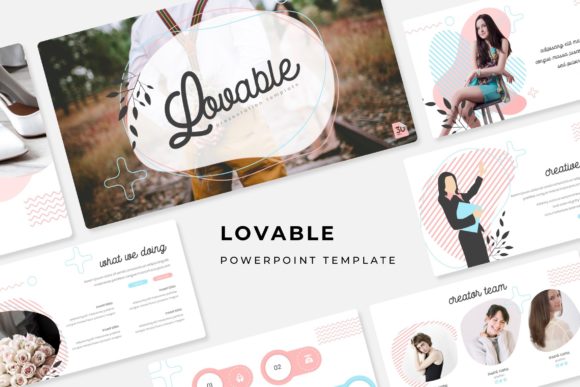
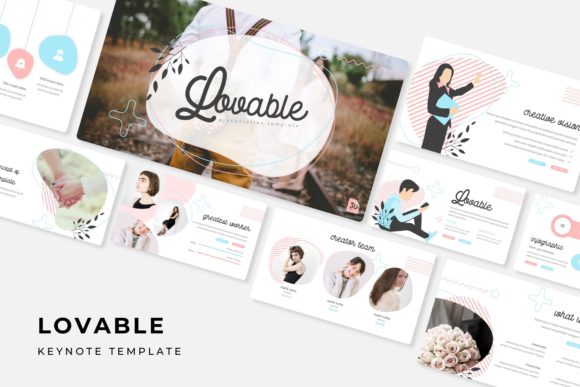
For professionals, entrepreneurs, and educators, the task of creating a visually compelling and structurally sound presentation is often a significant drain on time and creative energy. The Lovable Keynote Template emerges as a resource designed to address this challenge directly. It is a comprehensive PowerPoint package, providing a foundation of master slides, pixel-perfect illustrations, and a modular design system that allows users to assemble professional presentations efficiently.
What makes this template noteworthy is its structured approach to variability. Rather than being a single, static file, it is a system built around five distinct premade color themes. Each color variation contains a full set of 30 slides, culminating in 150 total slides across the package. This design choice is significant; it offers not just aesthetic alternatives but cohesive thematic packages, ensuring that if you switch from a blue theme to a green one, every infographic, section break, and placeholder maintains color harmony and professional consistency.
Core Characteristics and Usability
The architecture of the Lovable Keynote Template is based on master slides. This is a crucial feature for practical usability. Master slides control the fundamental layout, font styles, and color placements for all subsequent slides. When you edit a master element—such as a footer font or a background color scheme—those changes propagate throughout the slides derived from it. This ensures global consistency and drastically reduces the manual labor of updating each slide individually, a common pitfall of less sophisticated templates.
Its content breakdown is methodical. The template includes dedicated sections for handcrafted infographics, gallery and portfolio displays, and section breaks. These are not merely decorative slides; they are functional frameworks. The infographics are built within PowerPoint, meaning they are fully editable—you can adjust data points, change colors within the theme, and modify text without needing specialized design software. Similarly, the picture placeholder system uses a drag-and-drop interface. You can insert your own photographs or graphics directly into predefined frames, with the template handling the scaling and positioning, which maintains layout integrity.
Strengths in Flexibility and Presentation Quality
A primary strength of this resource is its balance between guided structure and creative flexibility. The provided pixel-perfect illustrations and graphics are resizable and editable without loss of quality, allowing you to tailor them to specific content needs. For instance, an educator might adapt an infographic to highlight different statistical trends, while a marketer could resize icon sets to emphasize certain service features within a portfolio slide.
The inclusion of five separate PPTX files—each for a standard and a widescreen format—adds another layer of practical reliability. This acknowledges the real-world variance in display equipment. Presenting in a conference hall with a widescreen projector versus a standard office monitor is a different visual experience, and having the correctly proportioned file prevents last-minute formatting panics. The “Readme First” file and clear notation about font usage (with download links provided for the free fonts used) demonstrates an attention to user onboarding, reducing friction in the setup process.
Performance in Real-World Application
In a practical scenario, how does the Lovable Keynote Template perform? Consider a freelancer preparing a client pitch. They can select a color theme that aligns with the client’s brand identity. Using the master slides, they establish a consistent typography and color palette. The handcrafted infographics allow them to visually articulate project timelines or budget allocations without spending hours in a chart tool. The gallery slides offer a clean, professional way to showcase past work. The entire presentation maintains a high-quality, cohesive look, which enhances credibility and communicates organization.
For a small business owner creating an internal training module, the template’s section break slides help logically segment information. The editable graphics can be modified to represent company-specific processes. The reliance on master slides means that if a corporate color guideline changes, updating the entire training deck becomes a single-edit operation, protecting its long-term utility.
A notable and honest limitation, clearly stated by the provider, is that the attractive photographs shown in previews are for illustration only and are not included. Users must supply their own imagery. This is a standard practice in template design to keep file sizes manageable and avoid licensing issues, but it is a practical consideration for the buyer. Your presentation’s final visual impact will depend on the quality of the photos you insert into the placeholder frames.
Audience Fit and Project Suitability
The Lovable Keynote Template is particularly beneficial for individuals and teams who need to produce polished presentations regularly but lack dedicated graphic design resources. Its fit is strongest for:
- Professionals and Consultants: Who require client-facing materials that convey expertise and attention to detail.
- Educators and Trainers: Who need structured, clear, and visually engaging instructional materials.
- Marketers and Content Creators: Who craft pitches, reports, and portfolio showcases.
- Entrepreneurs and Small Business Owners: Who operate with limited time and budget but need to compete on professionalism.
It is less suited for projects requiring entirely bespoke, avant-garde artistic design. This template provides a high-quality framework, not a blank canvas for radical artistic experimentation. Its value lies in elevating standard business, educational, and promotional presentations to a more refined and effective level efficiently.
Long-Term Value and Final Observations
The long-term value of a template like this hinges on its adaptability and durability. The editable nature of all graphics and the master slide foundation mean it is not a one-use asset. As your branding or content needs evolve, the template can evolve with them. The five color variations offer restarting points for different campaigns or audiences without seeking a new template each time.
From a professional standpoint, the Lovable Keynote Template represents a thoughtful investment in workflow efficiency. It reduces the low-level design decisions that slow down presentation creation, allowing the creator to focus on the substance of their message. The objective quality of its construction—from pixel-perfect assets to dual-aspect ratio files—suggests a reliability that supports serious use.
Ultimately, whether this template fits your needs depends on your typical presentation demands. If your goals involve communicating information clearly, building trust with an audience, and maintaining a professional image without resorting to generic, bland slides, this system offers a practical path. It provides the tools to build something lovable—not through flashy excess, but through coherent, reliable, and adaptable design that serves the content and the presenter.