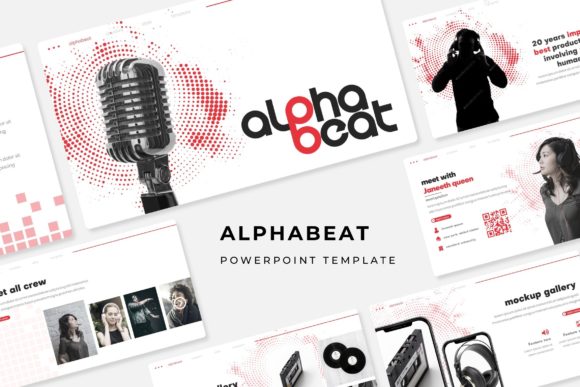
The Alphabeat Template: A Modern Toolkit for Compelling Presentations
In professional and educational environments, the presentation is a fundamental medium for communication. Whether pitching a new idea, delivering a training session, or showcasing research findings, the visual framework of your slides plays a critical role in engagement and comprehension. The Alphabeat PowerPoint Template emerges as a comprehensive solution designed to address the diverse needs of contemporary presenters. It is not merely a set of slides but a structured design system built for clarity, adaptability, and visual impact.
Understanding the Core Structure: A Design System
The Alphabeat template is fundamentally built on a master slide architecture. This means every slide derives from a core set of design principles, ensuring consistency in typography, spacing, and elemental placement across your entire presentation. The pixel-perfect illustrations and handcrafted infographics are integrated into this system, providing a cohesive visual language. This approach eliminates the common hassle of manually aligning elements or maintaining a uniform style, allowing the creator to focus on content rather than design mechanics.
A standout feature is the provision of five distinct premade color variations. Each variation comes as a complete set, with 30 slides dedicated to a specific color theme, totaling 150 unique slides across the package. This allows for strategic alignment with brand colors, thematic subject matter, or simply personal aesthetic preference. The colors are thoughtfully applied across all graphical elements, from backgrounds to infographics, creating a harmonious and professional look without requiring any color adjustment from the user.
Key Components and Functional Slides
Beyond standard content slides, the template includes specialized slide types tailored for specific presentation functions. The section break slides provide clear visual dividers, helping to segment a long presentation into digestible chapters. This is particularly useful for workshops or complex reports where transitioning between topics needs to be signaled clearly to the audience.
The gallery and portfolio slides offer structured layouts for showcasing images, products, or case studies. These slides come with resizable and editable graphic picture placeholders. The drag-and-drop functionality significantly simplifies the process of inserting visual assets. You can place an image into the designated area, and the template's design logic automatically handles the framing and integration, maintaining the slide's compositional balance.
Practical Advantages for Real-World Creation
The most immediate benefit of using a template like Alphabeat is the drastic reduction in preparation time. For business owners, educators, or researchers who frequently need to create presentations but may not have dedicated design skills, this toolkit provides a ready-made professional foundation. Starting from a blank slide every time is not only inefficient but often leads to visually inconsistent results.
The editable nature of all graphics is a significant practical advantage. The handcrafted infographics—such as charts, process flows, and diagrams—can be modified directly within PowerPoint. Text within icons can be changed, elements can be recolored using the standard PowerPoint color tools (while staying within the theme's palette), and components can be rearranged. This transforms static graphics into adaptable communication tools that can be customized to fit your specific data or narrative.
Accessibility and compatibility are also core considerations. The template includes links to download the free fonts used, ensuring you can easily match the typography if editing on a different system. The delivery as PPTX files means it works seamlessly with modern versions of PowerPoint, and the inclusion of widescreen (16:9) formats caters to contemporary displays and projection systems, avoiding awkward letterboxing or distorted images.
Considerations and Optimal Use Cases
It is important to note, as per the template details, that the photographs used in preview images are for illustration only and are not included. Users must supply their own imagery. This is standard for most presentation templates to avoid licensing issues and to encourage the use of relevant, original content. The placeholder system, however, makes inserting your own photographs straightforward.
The Alphabeat PowerPoint Template is particularly well-suited for scenarios requiring a series of presentations or a unified corporate look. A marketing team creating a campaign roll-out across multiple meetings can use the same color variant for consistency. An academic department can adopt one variant for all course-related slide decks, establishing a recognizable visual identity for students. The five color options also allow different teams or projects within the same organization to have distinct yet equally professional styles.
For hobbyists or creators entering professional spaces, such as freelancers or workshop leaders, this template offers an immediate upgrade in credibility. It provides the visual polish expected in business contexts without the cost of hiring a graphic designer for every presentation need.
Integration into Creative and Professional Workflows
Adopting a robust template like Alphabeat changes the presentation creation workflow. The process shifts from design-centric to content-centric. The initial step becomes selecting the appropriate color variant based on the context or audience. Next, the presenter can scan the 30-slide set for that variant to identify the pre-built layouts that best match their content structure—a title slide, a comparison slide, an infographic for statistics, a gallery for examples, and section breaks for pacing.
Content is then populated into these chosen slides. The text placeholders follow the master slide's font styles, ensuring readability. Data is mapped onto the editable infographics. Owned photographs are dragged into the picture placeholders. Because the foundational design is already handled, the creator's energy is directed entirely toward refining the message, sequencing the argument, and preparing for delivery. This workflow supports a more strategic approach to presentation development, where the visual design aids the communication goal rather than becoming a separate challenge.
For ongoing projects, the template also serves as a living document. A business owner might use it to create an initial investor pitch. As the business evolves, the same template file can be updated with new financial data on the infographic slides, replaced with new product photos in the gallery, and extended with additional section breaks for new business lines. The master slide foundation ensures all updates maintain the original professional quality.
Observations on Modern Presentation Standards
The features of the Alphabeat template reflect current expectations for professional presentations. Audiences today are visually sophisticated; cluttered slides, inconsistent formatting, or poorly integrated images can diminish the perceived authority of the content. Templates that offer a complete, editable system address this by elevating the baseline quality. The emphasis on widescreen formats, clean infographics, and structured galleries aligns with trends seen in high-impact conferences, corporate boardrooms, and online educational platforms.
Furthermore, the provision of multiple color variations within a single package acknowledges the need for versatility. A single, fixed-color template can be limiting. The ability to choose a theme that subtly influences tone—perhaps a cooler palette for a technical report, a warmer one for a creative proposal—adds a layer of strategic communication that goes beyond mere aesthetics.
In essence, tools like the Alphabeat PowerPoint Template democratize high-quality visual communication. They provide a structured canvas upon which professionals, educators, researchers, and creators can effectively build and share their ideas. By handling the complexities of consistent design, they free the presenter to focus on what matters most: crafting a clear, compelling, and memorable message for their audience.